Bear Blog proofreader
A dashboard plugin that adds a "Proofreader" button to the post editor, running your writing through a local grammar and spell checker.
Results show up in a panel below the editor, click any issue to jump straight to it in your text.1
Preview
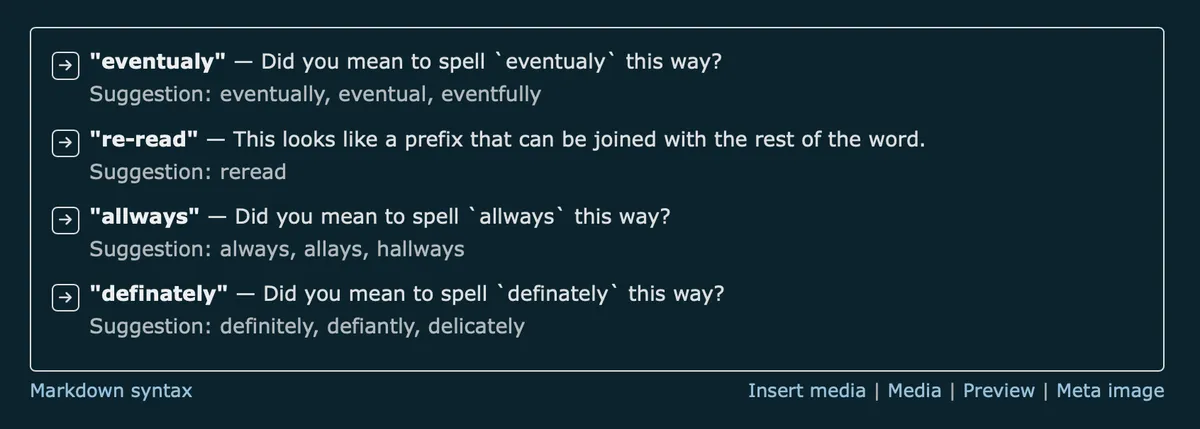
The screenshot above shows Proofreader checking this bit of text:
Every blogger eventualy learns the same lesson: no matter how many times you re-read a post, one typo allways survives. It's like a tiny gremlin that sneaks in right as you hit publish, grinning as it swaps "definately" for the version you meant to write. You'll never catch them all, and that's sort of the charm of it.
Four issues, four nudges in the right direction.
How to use
Installation
- Copy the script below.
- Go to Customise dashboard.
- Paste it under "Dashboard footer content".
- Save. Enjoy.
Checking your text
- Open a post and click Proofreader at the top of the editor.
- The first click loads Harper, so it takes a moment. After that it's instant.
- Issues appear in a panel below the editor, each with a short explanation and, where possible, a suggested fix.
- Click the → next to any issue to jump to it in the text.
- Editing the text hides the results, since the highlighted spots no longer line up. Run the check again when you're ready.
Your text is processed locally and never uploaded. Only the Harper library itself, not your writing, is loaded from a CDN the first time you click Proofreader.
Plugin
<script>
/*
 Plugin name: Proofreader
 Description: Adds a "Proofreader" button to the Bear dashboard editor that runs
              the post content through Harper (writewithharper.com), a local,
              privacy-first grammar and spell checker. Results are listed in a
              panel below the editor. Your text is processed locally in the
              browser and is never uploaded anywhere. The Harper library
              itself (code, not your text) is loaded from a CDN the first
              time you click Proofreader.
 Author: Robert Birming
 Author URI: https://robertbirming.com
*/
(function () {
  'use strict';

  const BODY_TEXTAREA_SELECTOR = '#body_content';
  const HARPER_CDN = 'https://unpkg.com/harper.js@1.12.0/dist/harper.js';

  let linter = null;
  let linterReady = null; // promise

  // --- Rule config -----------------------------------------------------
  // Harper ships with many rules; some default to off. Explicitly enabling
  // the fuller set here rather than relying on defaults, since the default
  // config only surfaces a subset of what Harper can actually catch.
  const LINT_CONFIG = {
    SpellCheck: true,
    SpelledNumbers: false, // don't nag about "5" vs "five"
    LongSentences: true,
    RepeatedWords: true,
    Matcher: true,          // "should of" -> "should have" style phrasing slips
    ExplanationMarks: true,
    SentenceCapitalization: true,
    UnclosedQuotes: true,
    Currency: true,
    Whitespace: true,
  };

  // DOMContentLoaded, but also runs immediately if the script is injected
  // after the event already fired (common for footer/dashboard scripts).
  function ready(fn) {
    if (document.readyState === 'loading') {
      document.addEventListener('DOMContentLoaded', fn);
    } else {
      fn();
    }
  }

  function loadHarper() {
    if (linterReady) return linterReady;

    linterReady = import(HARPER_CDN)
      .then(async (harper) => {
        const { WorkerLinter, binary } = harper;
        linter = new WorkerLinter({ binary });
        await linter.setup();
        await linter.setLintConfig(LINT_CONFIG);
        return linter;
      })
      .catch((err) => {
        linterReady = null; // allow retry on next click
        throw err;
      });

    return linterReady;
  }

  // Ensures .sticky-controls evenly spaces its button children, regardless
  // of how many plugins (Proofreader, Notes, etc.) inject buttons into it
  // or in what order they load. A shared marker attribute makes this a
  // no-op if another plugin already applied it, and vice versa.
  function buildUI($textarea) {
    if (document.getElementById('bb-proofreader-btn')) return;

    const stickyControls = document.querySelector('.sticky-controls');
    if (!stickyControls) {
      console.warn('[Proofreader] .sticky-controls not found — button not added.');
      return;
    }

    const btn = document.createElement('button');
    btn.id = 'bb-proofreader-btn';
    btn.type = 'button';
    btn.textContent = 'Proofreader';
    // .sticky-controls isn't a flex/gap container. Margin on both sides
    // (rather than just one) means this button keeps consistent spacing
    // from its neighbor regardless of whether another plugin's button
    // loads before or after it.
    btn.style.marginInline = '0.35rem';
    btn.setAttribute('aria-controls', 'bb-proofreader-panel');
    stickyControls.appendChild(btn);

    // The panel holds interactive buttons, so it's a region rather than a
    // live region: role="status"/aria-live is meant for terse announcements,
    // and nesting buttons inside one risks screen readers re-announcing the
    // whole list on every re-render. A separate, visually-hidden status
    // element (below) carries the "Checking…" / "No issues found." announcements.
    const panel = document.createElement('div');
    panel.id = 'bb-proofreader-panel';
    panel.setAttribute('role', 'region');
    panel.setAttribute('aria-label', 'Proofreader results');
    panel.style.display = 'none';
    panel.style.marginTop = '1rem';
    panel.style.padding = '0.8em 1em';
    panel.style.border = '1px solid currentColor';
    panel.style.borderRadius = '4px';
    panel.style.fontSize = '0.9em';
    panel.style.maxHeight = '40vh';
    panel.style.overflowY = 'auto';
    panel.style.position = 'sticky';
    panel.style.top = '50px'; // sits just under .sticky-controls
    panel.style.background = 'inherit';
    panel.style.zIndex = '5';

    const status = document.createElement('div');
    status.id = 'bb-proofreader-status';
    status.setAttribute('role', 'status');
    status.setAttribute('aria-live', 'polite');
    // Visually hidden but still readable by assistive tech.
    status.style.position = 'absolute';
    status.style.width = '1px';
    status.style.height = '1px';
    status.style.overflow = 'hidden';
    status.style.clip = 'rect(0, 0, 0, 0)';
    status.style.whiteSpace = 'nowrap';

    $textarea.insertAdjacentElement('afterend', status);
    $textarea.insertAdjacentElement('afterend', panel);

    btn.addEventListener('click', () => runCheck($textarea, btn, panel, status));

    // Edited text invalidates the character offsets we've already shown,
    // so hide stale results rather than risk jumping to the wrong place.
    $textarea.addEventListener('input', () => {
      if (panel.style.display !== 'none') {
        panel.style.display = 'none';
      }
    });
  }

  // Scrolls the textarea so the given character range is visible, and
  // selects it, so clicking a result jumps straight to the offending text.
  function jumpToSpan($textarea, start, end) {
    // preventScroll stops focus() itself from causing an uncontrolled jump
    // before we've positioned the internal scroll and page scroll below.
    $textarea.focus({ preventScroll: true });
    $textarea.setSelectionRange(start, end);

    // There's no direct "scroll to character offset" API for a textarea,
    // so this estimates the offset's line number by counting newlines
    // before it, then scrolls proportionally within the textarea's own
    // scrollable content. Not pixel-perfect with variable-width fonts or
    // wrapped lines, but close enough to bring the match into view.
    const before = $textarea.value.slice(0, start);
    const totalLines = $textarea.value.split('\n').length || 1;
    const lineNumber = before.split('\n').length;
    const scrollRatio = totalLines > 1 ? (lineNumber - 1) / (totalLines - 1) : 0;
    $textarea.scrollTop = scrollRatio * ($textarea.scrollHeight - $textarea.clientHeight);

    // Scrolling *inside* the textarea only helps if the textarea itself
    // is visible on the page. Since the results panel sits below it and
    // can be sticky-scrolled far down, the textarea may be out of the
    // viewport entirely — this brings the page itself back to it.
    $textarea.scrollIntoView({ behavior: 'smooth', block: 'center' });
  }

  function renderResults(panel, lints, text, $textarea, status) {
    panel.innerHTML = '';
    panel.style.display = 'block';

    if (lints.length === 0) {
      panel.textContent = 'No issues found.';
      status.textContent = 'No issues found.';
      return;
    }

    status.textContent = lints.length === 1
      ? '1 issue found.'
      : `${lints.length} issues found.`;

    const list = document.createElement('ul');
    list.style.margin = '0';
    list.style.paddingInlineStart = '0';
    list.style.listStyle = 'none';

    for (const lint of lints) {
      const span = lint.span();
      const excerpt = text.slice(span.start, span.end);
      const message = lint.message();

      const item = document.createElement('li');
      item.style.marginBlockEnd = '0.6em';
      item.style.display = 'flex';
      item.style.alignItems = 'flex-start';
      item.style.gap = '0.5em';

      // Fixed-position jump marker: same element, same spot, every row —
      // avoids the ambiguity of "click anywhere in this text block" when
      // rows vary in length.
      const jumpBtn = document.createElement('button');
      jumpBtn.type = 'button';
      jumpBtn.textContent = '→';
      jumpBtn.title = `Jump to "${excerpt}" in the text`;
      jumpBtn.setAttribute('aria-label', `Jump to "${excerpt}" in the text`);
      jumpBtn.style.flex = '0 0 auto';
      jumpBtn.style.width = '1.6em';
      jumpBtn.style.height = '1.6em';
      jumpBtn.style.lineHeight = '1';
      jumpBtn.style.padding = '0';
      jumpBtn.style.border = '1px solid currentColor';
      jumpBtn.style.borderRadius = '4px';
      jumpBtn.style.background = 'transparent';
      jumpBtn.style.color = 'inherit';
      jumpBtn.style.cursor = 'pointer';
      jumpBtn.style.fontSize = '0.85em';
      jumpBtn.addEventListener('click', () => jumpToSpan($textarea, span.start, span.end));

      // Clicking the button briefly steals focus away from the textarea
      // before the click event fires, which can make the first
      // setSelectionRange() call land on the wrong (or no longer focused)
      // element. Preventing default on mousedown keeps focus on whatever
      // it already was, avoiding that race entirely.
      jumpBtn.addEventListener('mousedown', (e) => e.preventDefault());

      const textWrap = document.createElement('div');

      const excerptEl = document.createElement('strong');
      excerptEl.textContent = `"${excerpt}"`;

      textWrap.appendChild(excerptEl);
      textWrap.appendChild(document.createTextNode(` — ${message}`));

      if (lint.suggestion_count() > 0) {
        const suggestions = lint
          .suggestions()
          .map((sug) => sug.get_replacement_text())
          .filter(Boolean);

        if (suggestions.length > 0) {
          const sugEl = document.createElement('div');
          sugEl.style.opacity = '0.8';
          sugEl.textContent = `Suggestion: ${suggestions.join(', ')}`;
          textWrap.appendChild(sugEl);
        }
      }

      item.appendChild(jumpBtn);
      item.appendChild(textWrap);
      list.appendChild(item);
    }

    panel.appendChild(list);
  }

  let latestRequestId = 0;

  async function runCheck($textarea, btn, panel, status) {
    const originalLabel = btn.textContent;
    btn.disabled = true;
    btn.textContent = 'Checking…';
    status.textContent = 'Checking…';

    const requestId = ++latestRequestId;

    try {
      const text = $textarea.value;

      if (!text.trim()) {
        panel.style.display = 'block';
        panel.textContent = 'Nothing to check.';
        status.textContent = 'Nothing to check.';
        return;
      }

      const activeLinter = await loadHarper();
      const lints = await activeLinter.lint(text);

      // If the user edited the text (or fired another check) while this
      // request was in flight, its offsets no longer match what's in the
      // textarea. Drop it rather than render results that would point to
      // the wrong place.
      if (requestId !== latestRequestId || $textarea.value !== text) {
        return;
      }

      renderResults(panel, lints, text, $textarea, status);
    } catch (err) {
      if (requestId !== latestRequestId) return;
      panel.style.display = 'block';
      panel.textContent = 'Harper failed to load or run. Check the console for details.';
      status.textContent = 'Harper failed to load or run.';
      console.error('[Proofreader]', err);
    } finally {
      btn.disabled = false;
      btn.textContent = originalLabel;
    }
  }

  ready(function () {
    const $textarea = document.querySelector(BODY_TEXTAREA_SELECTOR);
    if (!$textarea) return;
    buildUI($textarea);
  });
})();
</script>
Want more? Check out the full Bear Blog library.
Requires JavaScript, available with Bear Blog subscription.↩