Bear Blog markdown toolbar
A dashboard plugin that adds a lightweight formatting toolbar to the post editor.
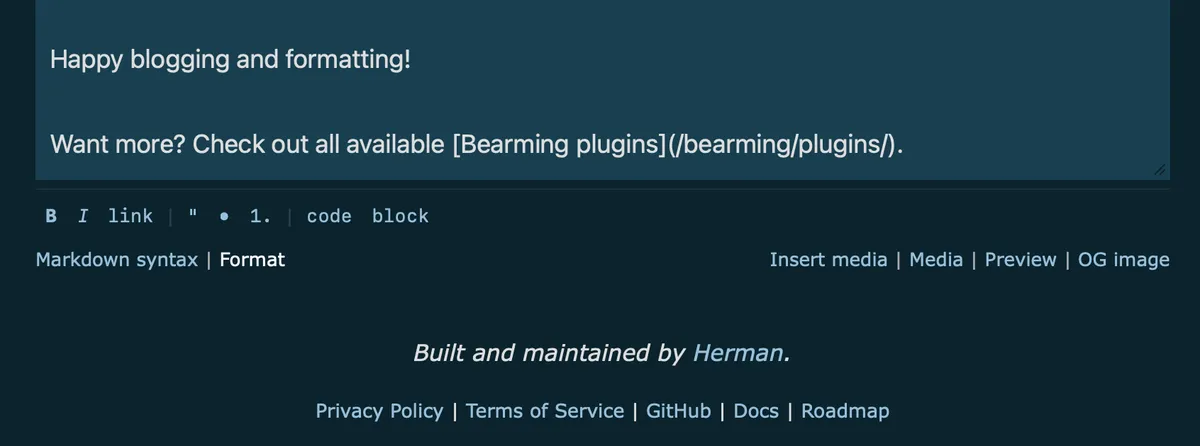
Select some text, click a button, done. It hides by default, sitting next to Bear's own "Markdown syntax" link at the bottom of the editor.1
Preview
How to use
Installation
- Copy the script below.
- Go to Customise dashboard.
- Paste it under "Dashboard footer content".
- Save. Enjoy.
Toolbar
Click Format to reveal the buttons:
B I link | " • 1. | code block
- Bold, italic, and inline code toggle, applying the shortcut again on already-formatted text removes it.
- Blockquote adds proper line breaks automatically for multi-line selections.
- Numbered list prefixes each line sequentially.
It also includes keyboard shortcuts:
- Cmd+B — bold
- Cmd+I — italic
- Cmd+K — inline code
- Cmd+U — unwrap any formatting
Bear already has a built-in trick for links: highlight text, paste a URL, and it automatically becomes a markdown link. So Cmd+K is freed up for inline code instead, which is fiddly to type manually.
Plugin
<script>
/*
 Plugin name: Markdown toolbar
 Description: Lightweight markdown toolbar for the Bear Blog editor.
 Author: Robert Birming
 Author URI: https://robertbirming.com
*/

(function () {
    'use strict';

    const $textarea = document.getElementById('body_content');
    const $helptext = document.querySelector('.helptext.sticky');
    if (!$textarea || !$helptext || $textarea.hasAttribute('data-md-toolbar')) return;
    $textarea.setAttribute('data-md-toolbar', '1');

    const isMac = /Mac|iPhone|iPad|iPod/.test(navigator.platform);

    // --- Styles ---

    const style = document.createElement('style');
    style.textContent = `
        #md-toolbar {
            display: none;
            gap: 0;
            padding: 5px 0 4px;
            align-items: center;
            flex-wrap: wrap;
            border-top: 1px solid rgba(255,255,255,0.08);
        }
        #md-toolbar.is-open {
            display: flex;
        }
        .md-btn {
            background: none;
            border: none;
            color: #8cc2dd;
            cursor: pointer;
            font-size: 13px;
            font-family: ui-monospace, monospace;
            padding: 2px 7px;
            border-radius: 3px;
            line-height: 1;
            user-select: none;
        }
        .md-btn:hover {
            color: #fff;
        }
        .md-sep {
            color: rgba(255,255,255,0.12);
            padding: 0 2px;
            font-size: 13px;
            pointer-events: none;
            user-select: none;
        }
        #md-toggle {
            background: none;
            border: none;
            color: #8cc2dd;
            cursor: pointer;
            font-size: small;
            font-family: inherit;
            padding: 0;
            margin: 0;
        }
        #md-toggle:hover {
            color: #fff;
        }
        #md-toggle.is-open {
            color: #fff;
        }
        @media (prefers-color-scheme: light) {
            #md-toolbar {
                border-top: 1px solid lightgrey;
            }
            .md-btn {
                color: #3273dc;
            }
            .md-btn:hover {
                color: #1a55b0;
            }
            .md-sep {
                color: #ddd;
            }
            #md-toggle {
                color: #3273dc;
            }
            #md-toggle:hover {
                color: #1a55b0;
            }
            #md-toggle.is-open {
                color: #1a55b0;
            }
        }
    `;
    document.head.appendChild(style);

    // --- Build toolbar ---

    const toolbar = document.createElement('div');
    toolbar.id = 'md-toolbar';

    const BUTTONS = [
        { label: 'B',     title: 'Bold (Cmd+B)',        action: 'bold' },
        { label: 'I',     title: 'Italic (Cmd+I)',      action: 'italic' },
        { label: 'link',  title: 'Link',                action: 'link' },
        { sep: true },
        { label: '"',     title: 'Quote',               action: 'quote' },
        { label: '•',     title: 'Bullet list',         action: 'list' },
        { label: '1.',    title: 'Numbered list',       action: 'numberedList' },
        { sep: true },
        { label: 'code',  title: 'Inline code (Cmd+K)', action: 'code' },
        { label: 'block', title: 'Code block',          action: 'codeBlock' },
    ];

    BUTTONS.forEach(function (def) {
        if (def.sep) {
            const sep = document.createElement('span');
            sep.className = 'md-sep';
            sep.textContent = '|';
            toolbar.appendChild(sep);
            return;
        }
        const btn = document.createElement('button');
        btn.type = 'button';
        btn.className = 'md-btn';
        btn.title = def.title;
        btn.setAttribute('aria-label', def.title);
        btn.textContent = def.label;
        if (def.label === 'B') btn.style.fontWeight = '700';
        if (def.label === 'I') btn.style.fontStyle = 'italic';
        btn.addEventListener('click', function () { handleAction(def.action); });
        toolbar.appendChild(btn);
    });

    // --- Toggle ---

    const toggle = document.createElement('button');
    toggle.id = 'md-toggle';
    toggle.type = 'button';
    toggle.textContent = 'Format';
    toggle.setAttribute('aria-label', 'Toggle markdown toolbar');
    toggle.addEventListener('click', function () {
        const open = toolbar.classList.toggle('is-open');
        toggle.classList.toggle('is-open', open);
    });

    // Inject toggle into left span of helptext bar
    const leftSpan = $helptext.querySelector('span:first-child');
    if (leftSpan) {
        const sep = document.createTextNode(' | ');
        leftSpan.appendChild(sep);
        leftSpan.appendChild(toggle);
    }

    // Inject toolbar above helptext bar
    $helptext.parentElement.insertBefore(toolbar, $helptext);

    // --- Helpers ---

    function getSel() {
        return {
            s: $textarea.selectionStart,
            e: $textarea.selectionEnd,
        };
    }

    function setSel(s, e) {
        $textarea.selectionStart = s;
        $textarea.selectionEnd = e;
    }

    function insert(text) {
        const { s, e } = getSel();
        const val = $textarea.value;
        $textarea.value = val.substring(0, s) + text + val.substring(e);
        const newPos = s + text.length;
        setSel(newPos, newPos);
        $textarea.dispatchEvent(new Event('input', { bubbles: true }));
    }

    // Toggle wrap — unwraps if already wrapped
    function wrap(w) {
        const v = $textarea.value;
        let { s, e } = getSel();

        $textarea.focus();

        if (s === e) {
            const placeholder = w === '`' ? 'code' : 'text';
            const ins = w + placeholder + w;
            insert(ins);
            setSel(s + w.length, s + w.length + placeholder.length);
            return;
        }

        const left  = v.slice(Math.max(0, s - w.length), s);
        const right = v.slice(e, e + w.length);
        if (left === w && right === w) {
            $textarea.value = v.slice(0, s - w.length) + v.slice(s, e) + v.slice(e + w.length);
            setSel(s - w.length, e - w.length);
            $textarea.dispatchEvent(new Event('input', { bubbles: true }));
            return;
        }

        const sel = v.slice(s, e);
        if (sel.startsWith(w) && sel.endsWith(w) && sel.length >= w.length * 2) {
            const unwrapped = sel.slice(w.length, sel.length - w.length);
            $textarea.value = v.slice(0, s) + unwrapped + v.slice(e);
            setSel(s, s + unwrapped.length);
            $textarea.dispatchEvent(new Event('input', { bubbles: true }));
            return;
        }

        insert(w + sel + w);
        setSel(s + w.length, e + w.length);
    }

    // Unwrap any formatting around cursor or selection
    function unwrapAny() {
        const ws = ['**', '*', '`'];
        const v  = $textarea.value;
        let { s, e } = getSel();

        $textarea.focus();

        if (s === e) {
            let L = s;
            while (L > 0 && !/\s/.test(v[L - 1])) L--;
            let R = s;
            while (R < v.length && !/\s/.test(v[R])) R++;
            if (L === R) return;
            s = L;
            e = R;
        }

        for (const w of ws) {
            const left  = v.slice(Math.max(0, s - w.length), s);
            const right = v.slice(e, e + w.length);
            if (left === w && right === w) {
                $textarea.value = v.slice(0, s - w.length) + v.slice(s, e) + v.slice(e + w.length);
                setSel(s - w.length, e - w.length);
                $textarea.dispatchEvent(new Event('input', { bubbles: true }));
                return;
            }
        }

        const sel = v.slice(s, e);
        for (const w of ws) {
            if (sel.startsWith(w) && sel.endsWith(w) && sel.length >= w.length * 2) {
                const unwrapped = sel.slice(w.length, sel.length - w.length);
                $textarea.value = v.slice(0, s) + unwrapped + v.slice(e);
                setSel(s, s + unwrapped.length);
                $textarea.dispatchEvent(new Event('input', { bubbles: true }));
                return;
            }
        }
    }

    function prefixLines(prefix) {
        const v = $textarea.value;
        const { s, e } = getSel();
        const lineStart = v.lastIndexOf('\n', s - 1) + 1;
        const lineEnd   = v.indexOf('\n', e) === -1 ? v.length : v.indexOf('\n', e);
        const prefixed  = v.substring(lineStart, lineEnd)
            .split('\n')
            .map(function (l) { return prefix + l; })
            .join('\n');
        $textarea.focus();
        setSel(lineStart, lineEnd);
        insert(prefixed);
        setSel(lineStart, lineStart + prefixed.length);
    }

    function prefixQuoteLines() {
        const v = $textarea.value;
        const { s, e } = getSel();
        const lineStart = v.lastIndexOf('\n', s - 1) + 1;
        const lineEnd   = v.indexOf('\n', e) === -1 ? v.length : v.indexOf('\n', e);
        const lines     = v.substring(lineStart, lineEnd).split('\n');
        const prefixed  = lines
            .map(function (l, i) { return '> ' + l + (i < lines.length - 1 ? '  ' : ''); })
            .join('\n');
        $textarea.focus();
        setSel(lineStart, lineEnd);
        insert(prefixed);
        setSel(lineStart, lineStart + prefixed.length);
    }

    function prefixNumberedLines() {
        const v = $textarea.value;
        const { s, e } = getSel();
        const lineStart = v.lastIndexOf('\n', s - 1) + 1;
        const lineEnd   = v.indexOf('\n', e) === -1 ? v.length : v.indexOf('\n', e);
        const prefixed  = v.substring(lineStart, lineEnd)
            .split('\n')
            .map(function (l, i) { return (i + 1) + '. ' + l; })
            .join('\n');
        $textarea.focus();
        setSel(lineStart, lineEnd);
        insert(prefixed);
        setSel(lineStart, lineStart + prefixed.length);
    }

    function doLink() {
        const { s, e } = getSel();
        const text  = $textarea.value.substring(s, e);
        const label = text || 'link text';
        const md    = '[' + label + ']()';
        $textarea.focus();
        setSel(s, s + text.length);
        insert(md);
        const urlPos = s + 1 + label.length + 2;
        setSel(urlPos, urlPos);
    }

    // --- Action handler ---

    function handleAction(action) {
        switch (action) {
            case 'bold':         wrap('**'); break;
            case 'italic':       wrap('*');  break;
            case 'code':         wrap('`');  break;
            case 'link':         doLink();   break;
            case 'quote':        prefixQuoteLines();    break;
            case 'list':         prefixLines('- ');     break;
            case 'numberedList': prefixNumberedLines(); break;
            case 'codeBlock': {
                const { s, e } = getSel();
                const atLineStart = s === 0 || $textarea.value[s - 1] === '\n';
                const sel = $textarea.value.substring(s, e);
                insert((atLineStart ? '' : '\n') + '```\n' + (sel || '') + '\n```\n');
                break;
            }
        }
    }

    // --- Keyboard shortcuts ---

    $textarea.addEventListener('keydown', function (e) {
        const mod = isMac ? e.metaKey : e.ctrlKey;
        if (!mod) return;
        const k = (e.key || '').toLowerCase();
        if      (k === 'b') { e.preventDefault(); wrap('**'); }
        else if (k === 'i') { e.preventDefault(); wrap('*');  }
        else if (k === 'k') { e.preventDefault(); wrap('`');  }
        else if (k === 'u') { e.preventDefault(); unwrapAny(); }
    });

})();
</script>
Want more? Check out the full Bear Blog library.
Requires JavaScript, available with Bear Blog subscription.↩