Bear Blog media tools
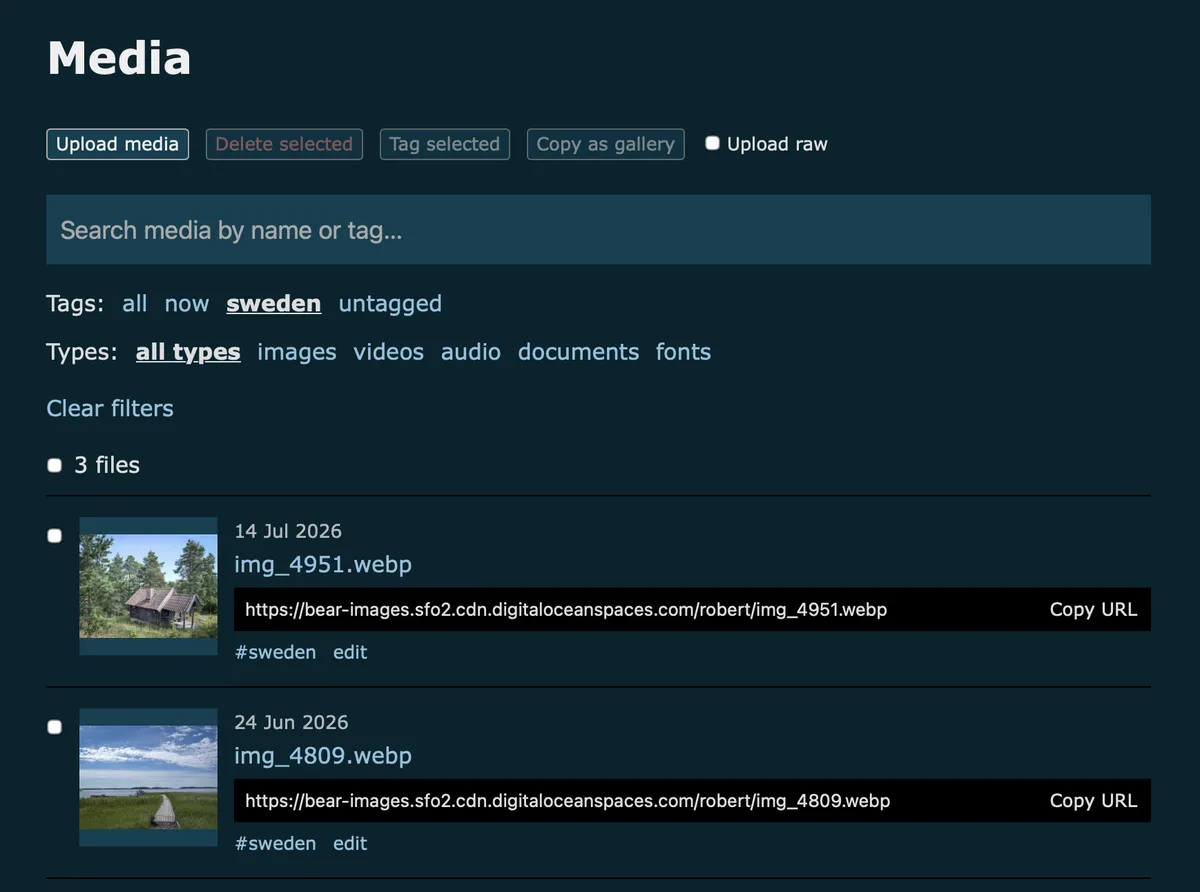
A dashboard plugin that adds two handy tools to the Bear media page: tag several files at once, and copy selected images as a ready-to-paste gallery.
Both buttons sit next to Bear's own "Delete selected", and wake up as soon as you check a file. Bulk tagging uses Bear's own tag forms, so filters and tag chips stay in sync. Copied galleries use the Photo gallery format, so they're one paste away from a neat photo grid.1
Preview
How to use
Installation
- Copy the script below.
- Go to Customise dashboard.
- Paste it under "Dashboard footer content".
- Save. Enjoy.
Tagging several files
- On the media page, check the files you want to tag.
- Click Tag selected. The field shows the tags all selected files already share.
- Add tags, separated by commas, or remove shared ones you no longer want.
- Click Save, or press Enter.
Each file keeps its other tags. Only the tags you add or remove change. Press Escape or click Cancel to close without saving.
Copying a gallery
- Check the images you want in your gallery. Filtering by a tag first makes this quick.
- Click Copy as gallery.
- Paste into a post or page.
You get one linked image per line, ready for the Photo gallery styles:
[](example-1.webp)
[](example-2.webp)
[](example-3.webp)
The alt text comes from each image's tags. Without tags, a descriptive file name is used instead, like "Harbour at dawn". Camera names like img_6090 get an empty alt, so they're easy to spot and fill in by hand.
Plugin
<script>
/*
Plugin name: Media tools
Description: Tag several media files at once, and copy selected images as a ready-to-paste gallery.
Author: Robert Birming
Author URI: https://robertbirming.com
*/
(function () {
'use strict';
const $controls = document.querySelector('.media-controls');
const $list = document.querySelector('.media-list');
if (!$controls || !$list) return;
const $delete = document.getElementById('deleteSelected');
const $before = $controls.querySelector('.media-raw');
const tools = [];
/* Shared
========================================================================== */
// Buttons are enabled and disabled together with Bear's delete button, unless busy
function sync() {
const off = !$delete || $delete.disabled;
tools.forEach(tool => {
if (!tool.locked) tool.button.disabled = off;
});
}
function addTool(id, label) {
const button = document.createElement('button');
button.type = 'button';
button.id = id;
button.textContent = label;
$controls.insertBefore(button, $before);
const tool = { button, label, locked: false, timer: 0 };
tools.push(tool);
return tool;
}
function lock(tool, state) {
tool.locked = state;
tool.button.disabled = state;
if (!state) sync();
}
// Short message on the button, then back to its label
function flash(tool, message) {
clearTimeout(tool.timer);
tool.button.textContent = message;
tool.timer = setTimeout(() => tool.button.textContent = tool.label, 2000);
}
function plural(count, word) {
return `${count} ${word}${count === 1 ? '' : 's'}`;
}
// Checked rows among the files the filters show, optionally of one type
function selectedRows(type) {
const selector = type ? `.media-row[data-type="${type}"]` : '.media-row';
return [...$list.querySelectorAll(selector)].filter(row =>
!row.hidden && row.querySelector('input[name="selected_media"]').checked
);
}
// Trimmed tags, duplicates removed case-insensitively
function parseTags(value) {
const seen = new Set();
return value.split(',')
.map(tag => tag.trim())
.filter(tag => {
const key = tag.toLowerCase();
if (!tag || seen.has(key)) return false;
seen.add(key);
return true;
});
}
function tagsOf(row) {
const field = row.querySelector('.media-tag-form')?.elements.tags;
return field ? parseTags(field.defaultValue) : [];
}
// Each tool runs on its own, so one failing never stops the other
function run(name, setup) {
try {
setup();
} catch (error) {
console.error(`Media tools: ${name} failed`, error);
}
}
/* Bulk tags
========================================================================== */
run('Bulk tags', () => {
const tool = addTool('bulkTags', 'Tag selected');
const $button = tool.button;
$button.setAttribute('aria-expanded', 'false');
$button.setAttribute('aria-controls', 'bulkTagsPanel');
// Panel, reusing the look of the built-in tag form
const $panel = document.createElement('div');
$panel.id = 'bulkTagsPanel';
$panel.className = 'media-tag-form';
$panel.hidden = true;
$panel.innerHTML = `
<label for="bulkTagsInput">Tags for selected files</label>
<input id="bulkTagsInput" type="text" autocomplete="off" aria-describedby="bulkTagsHelp">
<small id="bulkTagsHelp">Separate tags with commas. Shows tags all selected files share. Other tags are kept.</small>
<div>
<button type="button" data-mode="save">Save</button>
<button type="button" data-mode="cancel">Cancel</button>
<span class="tag-status" role="status"></span>
</div>
`;
$controls.after($panel);
const $input = $panel.querySelector('#bulkTagsInput');
const $status = $panel.querySelector('.tag-status');
const $actions = [...$panel.querySelectorAll('button')];
let shared = [];
// Tags every selected file has, compared case-insensitively
function sharedTags(rows) {
if (!rows.length) return [];
const others = rows.slice(1).map(row => tagsOf(row).map(tag => tag.toLowerCase()));
return tagsOf(rows[0]).filter(tag => others.every(list => list.includes(tag.toLowerCase())));
}
function setOpen(open) {
$panel.hidden = !open;
$button.setAttribute('aria-expanded', String(open));
if (!open) return;
shared = sharedTags(selectedRows());
$input.value = shared.join(', ');
$status.textContent = '';
$input.focus();
}
function close() {
setOpen(false);
$button.focus();
}
function setBusy(state) {
$input.disabled = state;
$actions.forEach(btn => btn.disabled = state);
lock(tool, state);
}
// Bear's own tag form does the saving, so filters and chips stay in sync.
// Its save button is disabled while the request runs.
function waitForSave(form) {
const $save = form.querySelector('button[type="submit"]');
const started = Date.now();
return new Promise(resolve => {
(function check() {
if (!$save.disabled || Date.now() - started > 15000) {
resolve(form.querySelector('.tag-status').textContent === '');
return;
}
setTimeout(check, 100);
})();
});
}
async function apply() {
const tags = parseTags($input.value);
const lower = tags.map(tag => tag.toLowerCase());
// Shared tags taken out of the field are removed from every file
const removed = shared
.map(tag => tag.toLowerCase())
.filter(tag => !lower.includes(tag));
// Collect first, Bear clears the checkboxes after each save
const rows = selectedRows();
if (!rows.length) {
$status.textContent = 'No files selected.';
return;
}
let saved = 0, skipped = 0, failed = 0;
setBusy(true);
for (const [i, row] of rows.entries()) {
$status.textContent = `Saving ${i + 1} of ${rows.length}…`;
const form = row.querySelector('.media-tag-form');
const current = tagsOf(row);
const kept = current.filter(tag => !removed.includes(tag.toLowerCase()));
const value = parseTags(kept.concat(tags).join(',')).join(', ');
if (value === current.join(', ')) {
skipped++;
continue;
}
if (value.length > 500) {
failed++;
continue;
}
form.elements.tags.value = value;
form.requestSubmit();
(await waitForSave(form)) ? saved++ : failed++;
}
setBusy(false);
const parts = [`${plural(saved, 'file')} updated`];
if (skipped) parts.push(`${skipped} unchanged`);
if (failed) parts.push(`${failed} failed`);
if (failed) {
$status.textContent = parts.join(', ') + '.';
return;
}
$input.value = '';
close();
flash(tool, parts.join(', '));
}
$button.addEventListener('click', () => setOpen($panel.hidden));
$panel.addEventListener('click', event => {
const mode = event.target.closest('button')?.dataset.mode;
if (mode === 'save') apply();
if (mode === 'cancel') close();
});
$input.addEventListener('keydown', event => {
if (event.key === 'Enter') {
event.preventDefault();
apply();
}
if (event.key === 'Escape') close();
});
});
/* Copy as gallery
========================================================================== */
run('Copy as gallery', () => {
const tool = addTool('copyGallery', 'Copy as gallery');
function sentenceCase(text) {
return text.charAt(0).toUpperCase() + text.slice(1);
}
// The file's tags, if it has any
function altFromTags(row) {
return sentenceCase(tagsOf(row)
.map(tag => tag.replace(/[\[\]]/g, '').trim())
.filter(Boolean)
.join(', '));
}
// Camera-style names get an empty alt so they stand out for writing by hand
function altFromName(name) {
const base = name.replace(/\.[^.]+$/, '');
const cameraName = /^(img|dsc|dscn|pxl|photo)[_-]?\d+/i.test(base)
|| /^\d{6,}/.test(base)
|| /^\d+(-\d+)?$/.test(base)
|| /^[0-9a-f]{8}-[0-9a-f]{4}-/i.test(base);
if (cameraName) return '';
return sentenceCase(base.replace(/[-_]+/g, ' ').replace(/[\[\]]/g, '').trim());
}
// One linked image per line, in the theme's #gallery format
function buildGallery(rows) {
return rows.map(row => {
const url = row.querySelector('input[name="selected_media"]').value;
const alt = altFromTags(row) || altFromName(row.dataset.name);
return `[](${url})`;
}).join('\n');
}
tool.button.addEventListener('click', async () => {
const rows = selectedRows('images');
if (!rows.length) {
flash(tool, 'No images selected');
return;
}
try {
await navigator.clipboard.writeText(buildGallery(rows));
flash(tool, `Copied ${plural(rows.length, 'image')}`);
} catch (error) {
flash(tool, 'Copy failed');
}
});
});
if ($delete) {
new MutationObserver(sync).observe($delete, { attributes: true, attributeFilter: ['disabled'] });
}
sync();
})();
</script>
Want more? Check out the full Bear Blog library.
Requires JavaScript, available with Bear Blog subscription.↩