Photo page plugin
A dashboard plugin that swaps the photo on your /photo page in one click.
A /photo page is like a /now page, but for photography: one photo, swapped now and then. This plugin takes care of the swapping. Pick a photo and it uploads it, replaces the old one, and leaves your cursor ready for a caption.
Preview
How to use
Installation
- Copy the script below.
- Go to Customise dashboard.
- Paste it under "Dashboard footer content".
- Save. Enjoy.
No settings needed
The plugin works on a page with the link /photo or /pic, so there's nothing to set up.
Swapping the photo
- Click Photo in the dashboard nav, between Pages and Themes, to open your photo page.
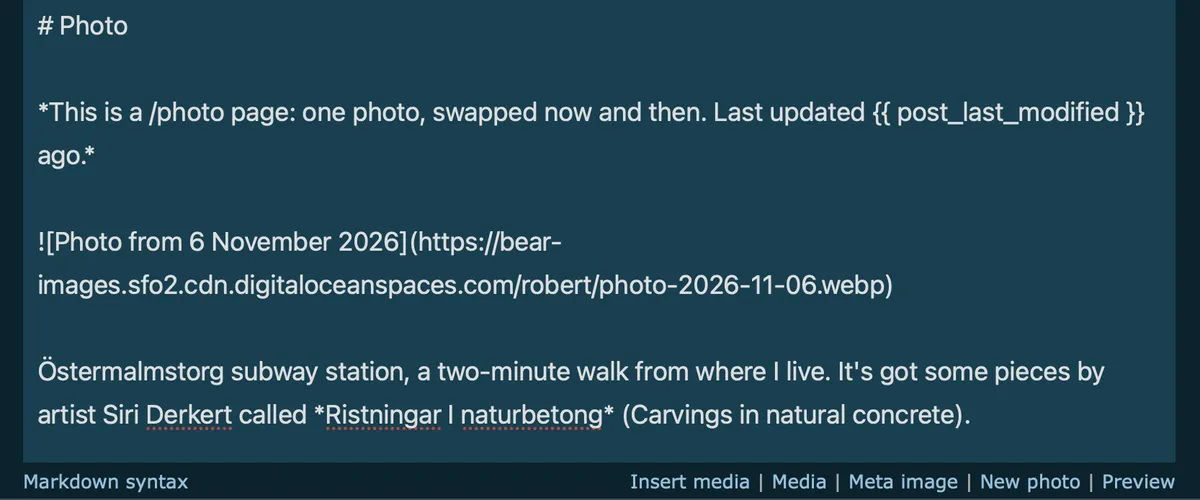
- Click New photo under the editor and pick a photo.
- The old photo and its caption are replaced with the new one, and your cursor lands on the line below.
- Write a caption, if you want one, and save the page.
If Photo can't find your page right away, it opens your pages list instead. Open your photo page from there once, and it goes straight to it after that.
The plugin reads the date the photo was taken and uses it in two places:
- The alt text, like
. - The file name in your media library, like
photo-2026-11-14.jpg.
If the photo has no date stored in it, the file's last-modified date is used instead. You can edit the alt text to describe the photo, if you like.
The first photo on the page is the one that's replaced, along with the paragraph right below it, its caption. Everything else on the page stays as it is, so you can keep other things there too, like a list of other /photo pages.
Plugin
<script>
/*
Plugin name: New photo
Version: 1.0
Description: Swap the photo on your /photo page in one click.
Author: Robert Birming
Author URI: https://robertbirming.com
Adds "Photo" to the dashboard nav, and "New photo" under the editor
on your /photo or /pic page. Pick a photo, write a caption under it, save.
*/
(() => {
'use strict';
// Works with a page whose link is photo or pic
const SLUGS = ['photo', 'pic'];
const base = location.pathname.split('/dashboard/')[0];
const KEY = `new-photo-edit-url:${base}`;
// ---- "Photo" in the dashboard nav, between Pages and Themes ----------
const pagesLink = document.querySelector('nav a[href$="/dashboard/pages/"]');
if (pagesLink) {
const nav = document.createElement('a');
nav.href = `${base}/dashboard/pages/`;
nav.textContent = 'Photo';
pagesLink.after(' ', nav);
nav.addEventListener('click', async (event) => {
event.preventDefault();
let url = localStorage.getItem(KEY);
if (!url) {
try {
// Find the page in the pages list once, then remember it
const html = await (await fetch(`${base}/dashboard/pages/`)).text();
const doc = new DOMParser().parseFromString(html, 'text/html');
url = [...doc.querySelectorAll('a[href*="/dashboard/posts/"]')]
.find((a) => SLUGS.includes(a.textContent.trim().toLowerCase()))
?.getAttribute('href');
if (url) localStorage.setItem(KEY, url);
} catch { /* fall through to the pages list */ }
}
location.href = url || `${base}/dashboard/pages/`;
});
}
// ---- "New photo" under the editor, on the photo page only ------------
const header = document.querySelector('#header_content');
const body = document.querySelector('#body_content');
const preview = document.querySelector('#preview');
if (!header || !body) return;
const getSetting = (key) =>
((header.innerText || '').match(new RegExp(`^${key}:\\s*(.*)$`, 'mi')) || [])[1]?.trim() || '';
if (!SLUGS.includes(getSetting('link').toLowerCase().replace(/^\/|\/$/g, ''))) return;
// Remember this editor, so the nav link comes straight here next time
localStorage.setItem(KEY, location.pathname);
const upload = async (file) => {
const csrf = document.querySelector('[name="csrfmiddlewaretoken"]')?.value;
if (!csrf) throw new Error('Not on a Bear editor page');
const form = new FormData();
form.append('file', file, file.name);
const res = await fetch(`${base}/dashboard/upload-image/`, {
method: 'POST',
headers: { 'X-CSRFToken': csrf },
body: form,
credentials: 'same-origin'
});
const data = await res.json().catch(() => null);
const url = data?.urls?.[0];
if (!res.ok || typeof url !== 'string' || !url.trim()) {
throw new Error(data?.error || 'Upload failed');
}
return url;
};
// ---- Date taken, read from the photo itself -------------------------
// Looks for the Exif block (JPEG, and some HEIC files) and returns the
// date the photo was taken, or null if there isn't one
const dateTaken = async (file) => {
try {
const bytes = new Uint8Array(await file.slice(0, 512 * 1024).arrayBuffer());
const view = new DataView(bytes.buffer);
let start = -1;
for (let i = 0; i < bytes.length - 10; i++) {
if (bytes[i] === 0x45 && bytes[i + 1] === 0x78 && bytes[i + 2] === 0x69 &&
bytes[i + 3] === 0x66 && bytes[i + 4] === 0 && bytes[i + 5] === 0) {
start = i + 6; // "Exif\0\0", the TIFF header follows
break;
}
}
if (start < 0) return null;
const little = view.getUint16(start) === 0x4949;
const u16 = (o) => view.getUint16(start + o, little);
const u32 = (o) => view.getUint32(start + o, little);
// Find a tag in an IFD, returning the offset of its value
const find = (ifd, tag) => {
const count = u16(ifd);
for (let n = 0; n < count; n++) {
const entry = ifd + 2 + n * 12;
if (u16(entry) === tag) return u32(entry + 8);
}
return null;
};
const ifd0 = u32(4);
const exifIfd = find(ifd0, 0x8769);
const at = (exifIfd && find(exifIfd, 0x9003)) || find(ifd0, 0x0132);
if (!at) return null;
// "YYYY:MM:DD HH:MM:SS"
const text = String.fromCharCode(...bytes.slice(start + at, start + at + 19));
const m = text.match(/^(\d{4}):(\d{2}):(\d{2})/);
return m ? new Date(+m[1], +m[2] - 1, +m[3]) : null;
} catch {
return null;
}
};
const pad = (n) => String(n).padStart(2, '0');
const isoDate = (d) => `${d.getFullYear()}-${pad(d.getMonth() + 1)}-${pad(d.getDate())}`;
const longDate = (d) => d.toLocaleDateString('en-GB', { day: 'numeric', month: 'long', year: 'numeric' });
// ---- Swapping the photo ----------------------------------------------
// The first image on the page is the photo, and the paragraph right
// under it is its caption. Both are replaced, leaving the cursor where
// the new caption goes. Everything else stays as it is.
const swapPhoto = (url, alt) => {
const text = body.value;
const photo = `\n\n`;
const image = text.match(/^!\[[^\]]*\]\([^)]+\)[ \t]*$/m);
let before, after;
if (image) {
before = text.slice(0, image.index);
after = text.slice(image.index + image[0].length).replace(/^\s*\n/, '');
// A caption is a plain paragraph: not a heading, image, list, rule or HTML
const block = after.match(/^([^\n]+(?:\n[^\n]+)*)(\n\s*\n|\s*$)/);
if (block && !/^(#|!\[|[-*+] |\d+\. |---|<|\{\{|>)/.test(block[1])) {
after = after.slice(block[0].length);
}
} else {
// No photo yet: add it under the page heading, or at the top
const heading = text.match(/^# .*\n+/);
before = heading ? heading[0].replace(/\n+$/, '\n\n') : '';
after = text.slice(heading ? heading[0].length : 0);
}
body.value = `${before}${photo}\n\n${after.replace(/^\s+/, '')}`;
const cursor = before.length + photo.length;
body.focus();
body.setSelectionRange(cursor, cursor);
body.dispatchEvent(new Event('input', { bubbles: true })); // lets Bear's draft saving notice
};
const picker = document.createElement('input');
picker.type = 'file';
picker.accept = 'image/*';
picker.hidden = true;
document.body.append(picker);
const link = document.createElement('a');
link.href = '#';
link.textContent = 'New photo';
link.setAttribute('aria-live', 'polite'); // announces upload status
const status = (text, reset) => {
link.textContent = text;
if (reset) setTimeout(() => { link.textContent = 'New photo'; }, 3000);
};
let busy = false;
link.addEventListener('click', (event) => {
event.preventDefault();
if (!busy) picker.click();
});
picker.addEventListener('change', async () => {
const file = picker.files[0];
picker.value = '';
if (!file) return;
if (file.size > 10000000) {
alert('That photo is over the 10 MB limit. Try a smaller version.');
return;
}
const date = (await dateTaken(file)) || new Date(file.lastModified || Date.now());
const ext = (file.name.match(/\.[^.]+$/)?.[0] || '.jpg').toLowerCase();
const named = new File([file], `photo-${isoDate(date)}${ext}`, { type: file.type });
busy = true;
try {
status('Uploading…');
const url = await upload(named);
swapPhoto(url, `Photo from ${longDate(date)}`);
status('New photo ✓ (add a caption and save)', true);
} catch (error) {
console.error('New photo:', error);
status('Upload failed, try again', true);
} finally {
busy = false;
}
});
// Between "Media" and "Preview" in the bar under the editor
if (preview) preview.before(link, ' | ');
else body.after(link);
})();
</script>
Don't have a /photo page yet? Make one, and let me know so I can add you to the list.
Want more? Check out the full Bear Blog library.